Mindclear: AI Note Taker Voice2.2.1
Publisher Description

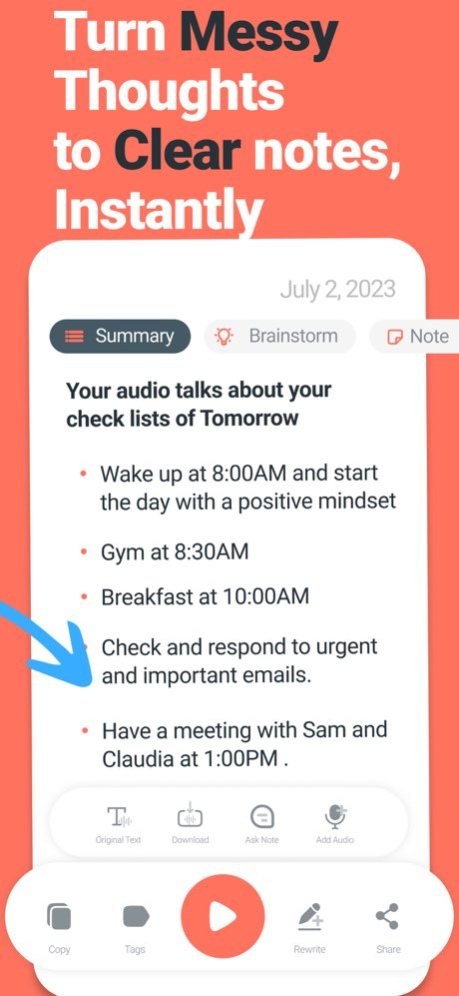

Turn your thoughts into clear text. Fast.
The #1 AI. voice note-taking app
Turn hours of note taking into minutes. Just speak, and let the AI transcribe, clean up and structure your voice.
How Its works :
1. Record Your Voice
Speak your thoughts, ideas, or anything else. Don't stress about pauses or mistakes, just talk naturally
2. Choose a style
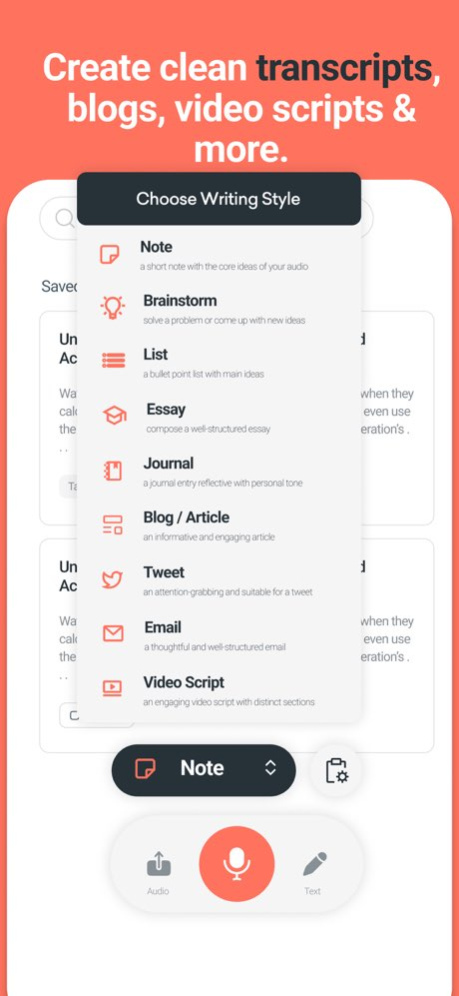
With the lastest AI technologies, MindClear will transcribe your voice into any kind of content. Journal entry, cleaned up transcript, blog... Your creativity is the only limit!
3. Edit & organize
Once your note is ready, you can tweak it to your liking or any different writing style. Add tags to organize your notes, or even edit the transcript.
Use cases:
- Brainstorming
Capture your creative sparks on the go! MindClear transcribes your brainstorming sessions, so you can focus on your next big idea without missing a beat.
Content Creation
Create content effortlessly! Dictate your thoughts directly into text and speed up the writing process. Ideal for bloggers, writers, and content marketers.
- Journaling
Document your personal journey with ease! Voice journaling with MindClear helps you express feelings, ideas, and memories without the need to type.
- Interviews
Transcribe interviews in real-time! Whether it's for journalism or research, MindClear provides accurate text from your recorded conversations.
- Meetings
Make meetings more productive! Record discussions, transcribe them instantly, and never miss an important detail again.
- Educational Notes
Enhance your learning! MindClear allows students and educators to convert lectures and study sessions into clear, organized notes for future reference.
Privacy Policy: https://sites.google.com/view/tysongillprivacypolicy
Terms of use: https://sites.google.com/view/tysontermsofuse/
Version History This update brings powerful new ways to work with your notes.
- Ask Chat about your notes for instant answers and insights
- Add more audio or text to the same note, all in one place
- Enjoy faster results across the app
- Customize your output with new style options
- Refined interface for a smoother experience
Update now and explore what’s new. 2.2.1 Apr 30 Dark Mode is Finally On MindClear :)
Your favorite app, now easier on the eyes.
• Refreshed Layout – A cleaner, more intuitive design for a smoother experience.
We hope that you like it,
thank you for your support 2.1.7 04/28/2025 We’ve made MindClear even better with this latest update:
• Extended Recording & Upload Time – Now record voice notes and upload audio files for up to 1 hour (previously 20 minutes).
• Refreshed Layout – A cleaner, more intuitive design for a smoother experience.
• Faster, All-Language Transcription – Your recordings can now be transcribed in any language, and it's faster than ever! 2.1.6 03/03/2025 MindClear Just Got Even Better!
Thank you for your valuable feedback—we’re always listening and working to bring you the best experience with features that truly matter to you.
- New Styles for More Flexibility
- Smoother & Faster Experience
- We’ve made several performance improvements and bug fixes to keep everything running seamlessly.
Thanks for using MindClear! Have feedback? We’d love to hear from you 2.1.5 02/24/2025 MindClear Just Got Even Better!
Thank you for your valuable feedback—we’re always listening and working to bring you the best experience with features that truly matter to you.
- New Styles for More Flexibility
- Smoother & Faster Experience
- We’ve made several performance improvements and bug fixes to keep everything running seamlessly.
Thanks for using MindClear! Have feedback? We’d love to hear from you 2.1.4 02/22/2025 MindClear Just Got Even Better!
Thank you for your valuable feedback—we’re always listening and working to bring you the best experience with features that truly matter to you.
- New Styles for More Flexibility
- Smoother & Faster Experience
- We’ve made several performance improvements and bug fixes to keep everything running seamlessly.
Thanks for using MindClear! Have feedback? We’d love to hear from you 2.1.3 02/19/2025 MindClear Just Got Even Better!
Thank you for your valuable feedback, we’re always listening and working to bring you the best experience with features that truly matter to you.
- New Styles for More Flexibility
- Smoother & Faster Experience
- We’ve made several performance improvements and bug fixes to keep everything running seamlessly.
Thanks for using MindClear! Have feedback? We’d love to hear from you 2.1.2 02/18/2025 We’ve been busy making MindClear even better, and this update brings some exciting improvements:
- Download Your Audio – Now Fixed!
You asked, we listened. The issue with downloading your recorded audio is now resolved, so you can easily save and access your original recordings anytime.
- A Better Timeline Experience
Your transcriptions are now displayed in a cleaner, more intuitive timeline—making it easier than ever to navigate through your notes.
- New Styles, More Possibilities
We’ve added fresh formatting styles to give you even more ways to refine your text. Whether you need summaries, structured outlines, or creative rewrites, there’s a style for every note.
- Smoother & Faster Performance
Bug fixes and optimizations to ensure everything runs effortlessly.
Thanks for using MindClear! If you have feedback, we’d love to hear from you. 2.1.1 02/12/2025 Big updates are here! We’ve made MindClear better than ever, with exciting new features to elevate your note-taking experience:
- Style Comparison View
Now you can see all your writing styles side by side, right on the same note. Compare them easily and choose the perfect one for your needs.
- Download Your Audio Recorded
You asked, we delivered. Now you can download the audio files you record or upload for ultimate flexibility.
- Add Amazing New Writing Styles
Meet your new favorites! We’ve added these highly requested styles:
• Summarize: Get concise, clear highlights of your notes.
• Instagram Captions: Perfect posts, every time.
• Social Media Posts: Share your story, optimized for any platform.
• LinkedIn Posts: Stand out professionally with polished updates.
• Pitch and Sales Posts: Seal the deal with compelling content.
• Newsletters: Create engaging emails that shine.
• Book Style: Transform notes into book-like narratives.
• Timeline: Organize events with a seamless timeline view.
- Copy & Share Made Easy
Effortlessly copy and share your full notes with just a tap.
- Saved Styles at a Glance
Quickly access all your styles in one place. Your creative work is now even more organized!
- Amazing features Coming Soon
Get ready for the future! We’re working on:
• Chat with Notes: Interact with your notes like never before.
• Audio Merging: Add new audio to existing recordings.
MindClear is evolving, and this is just the beginning. Update now to explore these powerful new updates! 2.1.0 12/03/2024 - Copy & Share results with one click
- New Writing Styles Added
* Turn your thoughts into clear text. in seconds. just Hit Record or upload audio and the app will take your audio and turn to magic well organized text ;)
Good for, summarize meetings notes & Calls, brainStorming thoughts, create blogs, essay, video scripts, tweets, replying to emails and lot more from just a rambling audio 1.4.8 11/13/2024 - Faster Transcription
- New Writing Styles Added, brainStorming ideas
* Turn your thoughts into clear text. in seconds. just Hit Record or upload audio and the app will take your audio and turn to magic well organized text ;)
Good for, summarize meetings notes & Calls, brainStorming thoughts, create blogs, essay, video scripts, tweets, replying to emails and lot more from just a rambling audio 1.4.7 11/05/2024 - Turn your thoughts into clear text. in seconds. just Hit Record or upload audio and the app will take your audio and turn to magic well organized text ;)
Good for, summarize meetings notes & Calls, create blogs, essay, video scripts, tweets, replying to emails and lot more from just a rambling audio 1.4.5 08/22/2024 - Turn your thoughts into clear text. in seconds. just Hit Record or upload audio and the app will take your audio and turn to magic well organized text ;)
Good for, summarize meetings notes & Calls, create blogs, essay, video scripts, tweets, replying to emails and lot more from just a rambling audio 1.4.4 08/10/2024 - Turn your thoughts into clear text. in seconds. just Hit Record or upload audio and the app will take your audio and turn to magic well organized text ;)
Good for, summarize meetings notes & Calls, create blogs, essay, video scripts, tweets, replying to emails and lot more from just a rambling audio 1.4.3 08/03/2024 - Quick Bug fixed 1.4.2 07/28/2024 - Faster Transcription
- Bugs fixed 1.4.1 07/23/2024 - Bugs fixed 1.3.8 05/23/2024 - New Style: BrainStorm your thoughts and ideas and get clear steps
- Enhanced the voice recording
- Faster Transcribing 1.3.7 04/21/2024 - Faster transcribing 1.3.6 04/10/2024 - Added option for upload audio
- Faster transcribing 1.3.5 03/21/2024 - Bugs fixed 1.3.4 02/09/2024 - New Styles Added
- Bugs fixed 1.3.3 01/07/2024 - Bugs fixed 1.3.2 12/11/2023 - New Text Styles
- Bugs fixed
I'm thrilled to share the exciting news that I'm currently working on integrating the new features that so many of you have been eagerly requesting. I can't wait to announce that these highly anticipated features will be ready for you in the very near future! 1.3.1 11/16/2023 - Faster transcribing
- Enhanced the Styles results
- Bugs fixed
I'm thrilled to share the exciting news that I'm currently working on integrating the new features that so many of you have been eagerly requesting. I can't wait to announce that these highly anticipated features will be ready for you in the very near future! 1.3 11/06/2023
About Mindclear: AI Note Taker Voice
The company that develops Mindclear: AI Note Taker Voice is Tyson Gill. The latest version released by its developer is 2.2.1.
To install Mindclear: AI Note Taker Voice on your iOS device, just click the green Continue To App button above to start the installation process. The app is listed on our website since 2026-10-07 and was downloaded 0 times. We have already checked if the download link is safe, however for your own protection we recommend that you scan the downloaded app with your antivirus. Your antivirus may detect the Mindclear: AI Note Taker Voice as malware if the download link is broken.
How to install Mindclear: AI Note Taker Voice on your iOS device:
- Click on the Continue To App button on our website. This will redirect you to the App Store.
- Once the Mindclear: AI Note Taker Voice is shown in the iTunes listing of your iOS device, you can start its download and installation. Tap on the GET button to the right of the app to start downloading it.
- If you are not logged-in the iOS appstore app, you'll be prompted for your your Apple ID and/or password.
- After Mindclear: AI Note Taker Voice is downloaded, you'll see an INSTALL button to the right. Tap on it to start the actual installation of the iOS app.
- Once installation is finished you can tap on the OPEN button to start it. Its icon will also be added to your device home screen.
Program Details
System requirements
Download information
Pricing
Version History
version 2.2.1
posted on 2026-10-07
Version History This update brings powerful new ways to work with your notes.
- Ask Chat about your notes for instant answers and insights
- Add more audio or text to the same note, all in one place
- Enjoy faster results across the app
- Customize your output with new style options
- Refined interface for a smoother experience
Update now and explore what’s new. 2.2.1 Apr 30 Dark Mode is Finally On MindClear :)
Your favorite app, now easier on the eyes.
• Refreshed Layout – A cleaner, more intuitive design for a smoother experience.
We hope that you like it,
thank you for your support 2.1.7 04/28/2025 We’ve made MindClear even better with this latest update:
• Extended Recording & Upload Time – Now record voice notes and upload audio files for up to 1 hour (previously 20 minutes).
• Refreshed Layout – A cleaner, more intuitive design for a smoother experience.
• Faster, All-Language Transcription – Your recordings can now be transcribed in any language, and it's faster than ever! 2.1.6 03/03/2025 MindClear Just Got Even Better!
Thank you for your valuable feedback—we’re always listening and working to bring you the best experience with features that truly matter to you.
- New Styles for More Flexibility
- Smoother & Faster Experience
- We’ve made several performance improvements and bug fixes to keep everything running seamlessly.
Thanks for using MindClear! Have feedback? We’d love to hear from you 2.1.5 02/24/2025 MindClear Just Got Even Better!
Thank you for your valuable feedback—we’re always listening and working to bring you the best experience with features that truly matter to you.
- New Styles for More Flexibility
- Smoother & Faster Experience
- We’ve made several performance improvements and bug fixes to keep everything running seamlessly.
Thanks for using MindClear! Have feedback? We’d love to hear from you 2.1.4 02/22/2025 MindClear Just Got Even Better!
Thank you for your valuable feedback—we’re always listening and working to bring you the best experience with features that truly matter to you.
- New Styles for More Flexibility
- Smoother & Faster Experience
- We’ve made several performance improvements and bug fixes to keep everything running seamlessly.
Thanks for using MindClear! Have feedback? We’d love to hear from you 2.1.3 02/19/2025 MindClear Just Got Even Better!
Thank you for your valuable feedback, we’re always listening and working to bring you the best experience with features that truly matter to you.
- New Styles for More Flexibility
- Smoother & Faster Experience
- We’ve made several performance improvements and bug fixes to keep everything running seamlessly.
Thanks for using MindClear! Have feedback? We’d love to hear from you 2.1.2 02/18/2025 We’ve been busy making MindClear even better, and this update brings some exciting improvements:
- Download Your Audio – Now Fixed!
You asked, we listened. The issue with downloading your recorded audio is now resolved, so you can easily save and access your original recordings anytime.
- A Better Timeline Experience
Your transcriptions are now displayed in a cleaner, more intuitive timeline—making it easier than ever to navigate through your notes.
- New Styles, More Possibilities
We’ve added fresh formatting styles to give you even more ways to refine your text. Whether you need summaries, structured outlines, or creative rewrites, there’s a style for every note.
- Smoother & Faster Performance
Bug fixes and optimizations to ensure everything runs effortlessly.
Thanks for using MindClear! If you have feedback, we’d love to hear from you. 2.1.1 02/12/2025 Big updates are here! We’ve made MindClear better than ever, with exciting new features to elevate your note-taking experience:
- Style Comparison View
Now you can see all your writing styles side by side, right on the same note. Compare them easily and choose the perfect one for your needs.
- Download Your Audio Recorded
You asked, we delivered. Now you can download the audio files you record or upload for ultimate flexibility.
- Add Amazing New Writing Styles
Meet your new favorites! We’ve added these highly requested styles:
• Summarize: Get concise, clear highlights of your notes.
• Instagram Captions: Perfect posts, every time.
• Social Media Posts: Share your story, optimized for any platform.
• LinkedIn Posts: Stand out professionally with polished updates.
• Pitch and Sales Posts: Seal the deal with compelling content.
• Newsletters: Create engaging emails that shine.
• Book Style: Transform notes into book-like narratives.
• Timeline: Organize events with a seamless timeline view.
- Copy & Share Made Easy
Effortlessly copy and share your full notes with just a tap.
- Saved Styles at a Glance
Quickly access all your styles in one place. Your creative work is now even more organized!
- Amazing features Coming Soon
Get ready for the future! We’re working on:
• Chat with Notes: Interact with your notes like never before.
• Audio Merging: Add new audio to existing recordings.
MindClear is evolving, and this is just the beginning. Update now to explore these powerful new updates! 2.1.0 12/03/2024 - Copy & Share results with one click
- New Writing Styles Added
* Turn your thoughts into clear text. in seconds. just Hit Record or upload audio and the app will take your audio and turn to magic well organized text ;)
Good for, summarize meetings notes & Calls, brainStorming thoughts, create blogs, essay, video scripts, tweets, replying to emails and lot more from just a rambling audio 1.4.8 11/13/2024 - Faster Transcription
- New Writing Styles Added, brainStorming ideas
* Turn your thoughts into clear text. in seconds. just Hit Record or upload audio and the app will take your audio and turn to magic well organized text ;)
Good for, summarize meetings notes & Calls, brainStorming thoughts, create blogs, essay, video scripts, tweets, replying to emails and lot more from just a rambling audio 1.4.7 11/05/2024 - Turn your thoughts into clear text. in seconds. just Hit Record or upload audio and the app will take your audio and turn to magic well organized text ;)
Good for, summarize meetings notes & Calls, create blogs, essay, video scripts, tweets, replying to emails and lot more from just a rambling audio 1.4.5 08/22/2024 - Turn your thoughts into clear text. in seconds. just Hit Record or upload audio and the app will take your audio and turn to magic well organized text ;)
Good for, summarize meetings notes & Calls, create blogs, essay, video scripts, tweets, replying to emails and lot more from just a rambling audio 1.4.4 08/10/2024 - Turn your thoughts into clear text. in seconds. just Hit Record or upload audio and the app will take your audio and turn to magic well organized text ;)
Good for, summarize meetings notes & Calls, create blogs, essay, video scripts, tweets, replying to emails and lot more from just a rambling audio 1.4.3 08/03/2024 - Quick Bug fixed 1.4.2 07/28/2024 - Faster Transcription
- Bugs fixed 1.4.1 07/23/2024 - Bugs fixed 1.3.8 05/23/2024 - New Style: BrainStorm your thoughts and ideas and get clear steps
- Enhanced the voice recording
- Faster Transcribing 1.3.7 04/21/2024 - Faster transcribing 1.3.6 04/10/2024 - Added option for upload audio
- Faster transcribing 1.3.5 03/21/2024 - Bugs fixed 1.3.4 02/09/2024 - New Styles Added
- Bugs fixed 1.3.3 01/07/2024 - Bugs fixed 1.3.2 12/11/2023 - New Text Styles
- Bugs fixed
I'm thrilled to share the exciting news that I'm currently working on integrating the new features that so many of you have been eagerly requesting. I can't wait to announce that these highly anticipated features will be ready for you in the very near future! 1.3.1 11/16/2023 - Faster transcribing
- Enhanced the Styles results
- Bugs fixed
I'm thrilled to share the exciting news that I'm currently working on integrating the new features that so many of you have been eagerly requesting. I can't wait to announce that these highly anticipated features will be ready for you in the very near future! 1.3 11/06/2023
version 2.1.7
posted on 2025-04-28
Dark Mode is Finally On MindClear :)
Your favorite app, now easier on the eyes.
• Refreshed Layout – A cleaner, more intuitive design for a smoother experience.
We hope that you like it,
thank you for your support
